How to block apps at the library or on campus
You walk into the library to work and spend the first twenty minutes on your phone. If that’s where it happens, tie a rule to the library: your apps are blocked when you get there and open again when you leave.

Free for 7 days.
Why a place works better than a timetable
Study hours change from day to day. A schedule set in Screen Time doesn’t know when a lecture runs late or you go in early before an exam, so it can block you on the bus home and let you scroll at your desk. A rule tied to the library is on whenever you’re there.
Set it up
- Install MindFence and allow Screen Time when it asks.
- Set Location to Always in Settings ▸ MindFence ▸ Location. On While Using the App, places aren’t checked at all.
- In Places, save the library. Search for it by name or use your current location. Give it a radius of 150 m or more, which covers most buildings.
- Tap New Rule and choose Study. It’s set to the library, and starts when you get there.
- Choose the apps: social, video, games. Leave the ones you study with.
- Choose how hard it is to get past, then tap Done.
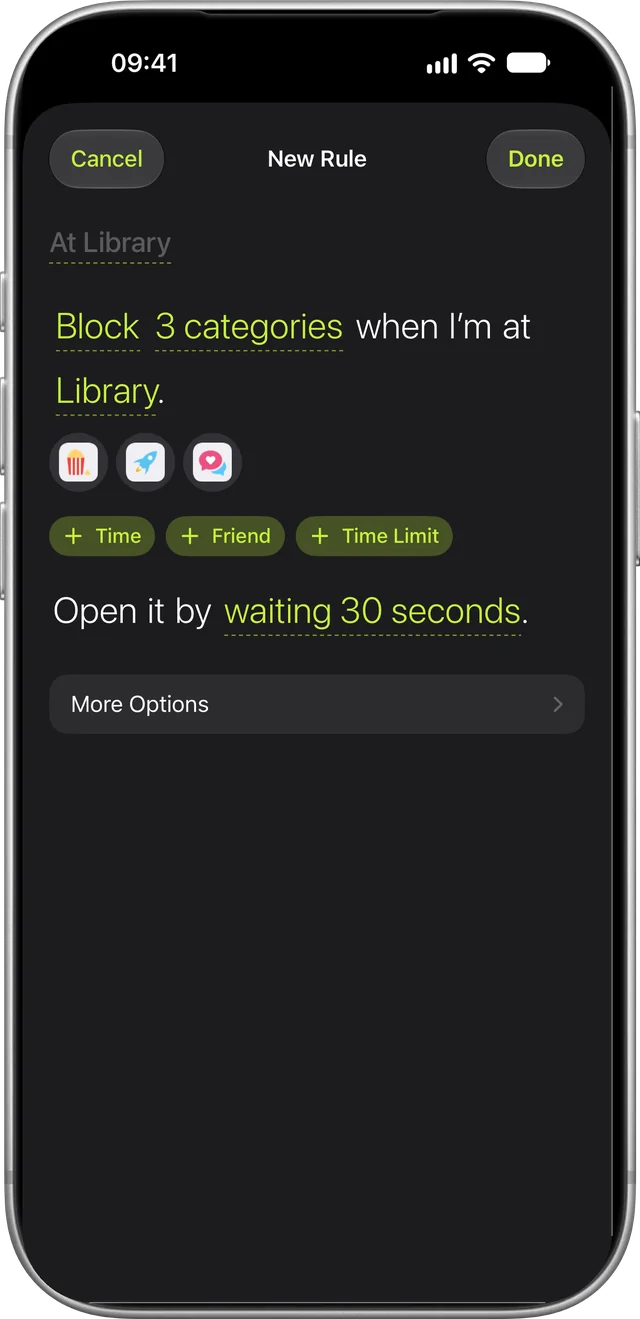
Walk in and the apps are blocked, even with MindFence closed. After you leave, they open again. Each place shows whether you’re there right now.
More than one place to study?
- Save each one, like the library, a favourite café or your department’s building. A rule can use any saved place.
- Big campus? If the campus Wi-Fi reaches every building, use it instead of a dozen places. In the Shortcuts app, make a personal automation for joining that Wi-Fi network and add MindFence’s Turn On a Rule. The rule turns on for an hour each time you join.
- Somewhere new for the afternoon? Turn a rule on Until I Leave This Location, and it stops when you go.
Your laptop too
The phone isn’t the only screen at the library. MindFence on a Mac blocks the sites you choose with the same rule, so when you get to the library your phone’s apps and your laptop’s distracting sites go quiet together.
- One rule, picked on each device. Your rules and places sync through iCloud. You choose the apps on your iPhone and the sites on your Mac.
- Safari and Chrome. A blocked site won’t load in either. Other Mac apps keep working.
- Keep it in the menu bar. The Mac notices you’ve arrived only while MindFence is open, so leave it running and set Location to Always.
Block apps when you’re both at the library
Studying together is easier when you’re both off your phones. Add a friend with one link, and a rule can start when you’re both at the library, so you keep each other on track. On a rule set to Ask a Friend, they can approve 15 minutes from their own phone when you really need an app, and you can see each other’s Time Blocked. Friends never see which apps you block.
How strict to make it
- Wait to Open makes a blocked app wait, from 10 seconds to 5 minutes, then opens it for 15 minutes. Good for a quick look at a group chat before getting back to work.
- Can’t Turn Off Early keeps the rule on until you leave. Good for exam season.
- Break the Glass opens a rule for 15 minutes when something really can’t wait, five times a month.
If it doesn’t start
- Check Location is set to Always, not While Using the App.
- Keep Wi-Fi switched on, even if you don’t join a network.
- If a place says it hasn’t noticed you yet, the pin may be on the wrong side of the building. Move it or make the place bigger.
More in Support. For study habits beyond blocking, see how to stop picking up your phone while studying.
Try MindFence free
Pick the apps, then where or when. No account needed. Works on iPhone and iPad with iOS 18 or later, and Mac with macOS 15.3 or later.
Free for 7 days.