How to block apps when you’re together
You sit down to dinner and you both reach for your phones. MindFence can block your apps when you and your partner are both home, and open them again later. It works for families and friends too.

Free for 7 days.
Why together works
It’s easier to put your phone down when the person next to you does too. A Screen Time schedule runs whoever’s in the room. A rule about being together starts only when you’re both there, and each of you blocks your own phone.
Set it up
- Install MindFence on both phones and allow Screen Time when it asks. Set Location to Always in Settings ▸ MindFence ▸ Location.
- In Places, save Home.
- In Friends, tap Add Friend and send the link to your partner. Your places are ticked to share, so untick any you’d rather keep to yourself.
- Your partner taps the link and accepts. Their matching places are shared back to you.
- Tap New Rule and choose Dinner Together. It blocks when you’re both at Home, from 19:00 to 21:00. Change the hours if you like.
- Choose the apps, then tap Done.
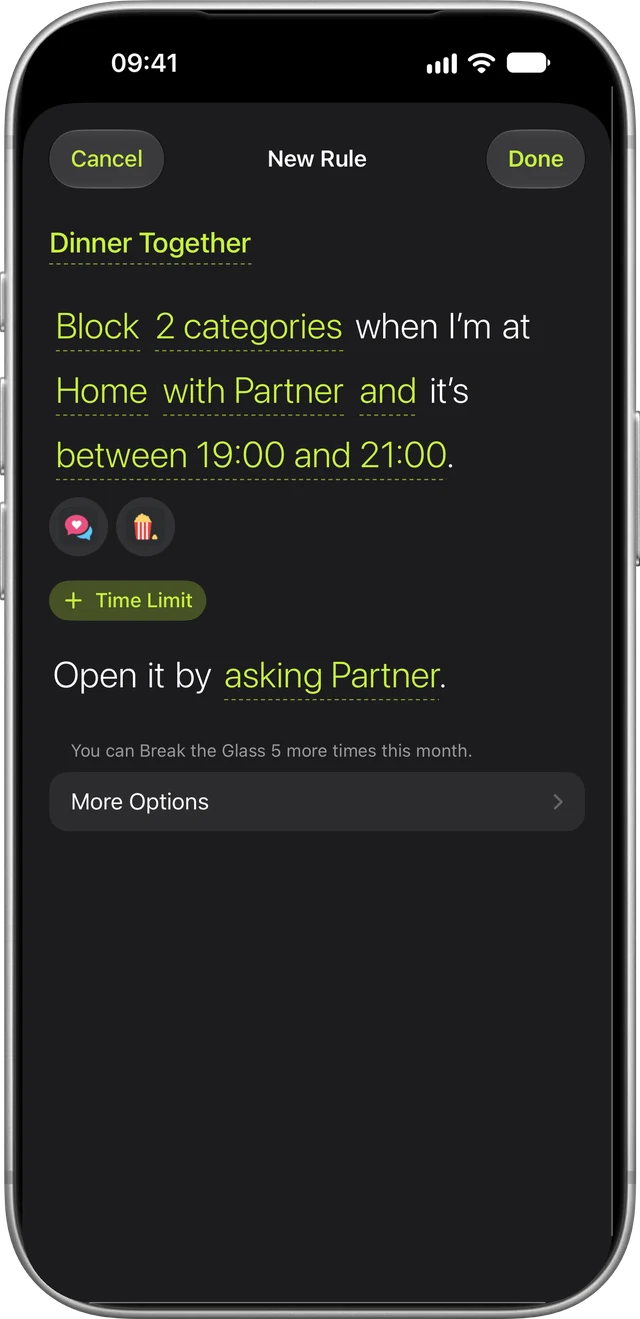
Your partner can make the same rule, or you can share yours. Open it and tap Share with a Friend. They accept it and choose their own apps, and it runs on both phones.
Ideas to start with
- Couples. Start from Dinner Together for the evening. For bedtime, make your own rule: social blocked when you’re both at Home, 22:00 to 07:00.
- Families. Everyone sets a rule on their own phone, like social and games blocked at Home from 18:00 to 21:00. One Family plan covers up to six people in your Family Sharing group.
- Friends studying together. Share the library and block apps when you’re both there. Or make a rule you turn on yourself, set to Ask a Friend, so your friend can give you 15 minutes when you ask.
Ask for more time
Set a rule to Ask a Friend and choose who. When an app is blocked, tap Ask and their name, and they can let you in for 15 minutes from their own phone, up to 3 times a day on each rule. They can’t change the rule or see what it blocks, and you can’t turn it off until it ends.
What friends see
- Your name.
- The places you share, and whether you’re at them right now.
- Rules you share, and the rules they can give you time on.
- Your time blocked, if you turn on Share Time Blocked with Friends.
They never see which apps you block. You can stop sharing a place or remove a friend at any time.
Questions
Does my partner need MindFence too?
Yes, on their own iPhone or iPad, and you both need to be signed in to iCloud. Each of you picks the apps for your own phone.
Can my partner block my apps?
No. Each of you blocks your own phone. On a rule set to Ask a Friend, the friend you choose can only let you in for 15 minutes.
What if one of us isn’t home?
Then the rule doesn’t start. It starts once you’re both there and stops after one of you leaves. Leaving is noticed less reliably than arriving.
Is there a plan for two or more?
The Family plan covers up to six people in your Family Sharing group. If you have your own subscription, you can include Partner Annual once when you invite your partner, so it costs them less.
Can I use it on my child’s phone?
MindFence is made for your own phone, and whoever holds the phone can change its rules. For a child’s phone, use Screen Time with Family Sharing.
Does it work on a Mac?
On a Mac, MindFence blocks websites, not apps. One subscription covers iPhone, iPad and Mac.
More in Support.
Get MindFence
Pick the apps, then where, when or who you’re with. No account needed. Works on iPhone and iPad with iOS 18 or later, and Mac with macOS 15.3 or later.
Free for 7 days.