An app blocker you can’t turn off early
If you keep switching your app blocker off, you want a rule that stays on until it’s done. In MindFence that’s called Can’t Turn Off Early.

Free for 7 days.
What it does
While a rule set to Can’t Turn Off Early is on, MindFence won’t let you turn it off, delete it or change which apps it blocks. It ends by itself:
- when the time is up, for a rule like 09:00 to 17:00
- when you leave, for a rule tied to a place like the library
- tomorrow, for a daily limit you’ve used up
So a rule like this always needs a time or a place.
Set it up
- Install MindFence and allow Screen Time when it asks.
- Tap New Rule and pick the apps.
- Add a time, a place, or both. For example, weekdays 09:00 to 17:00, or when you’re at the library.
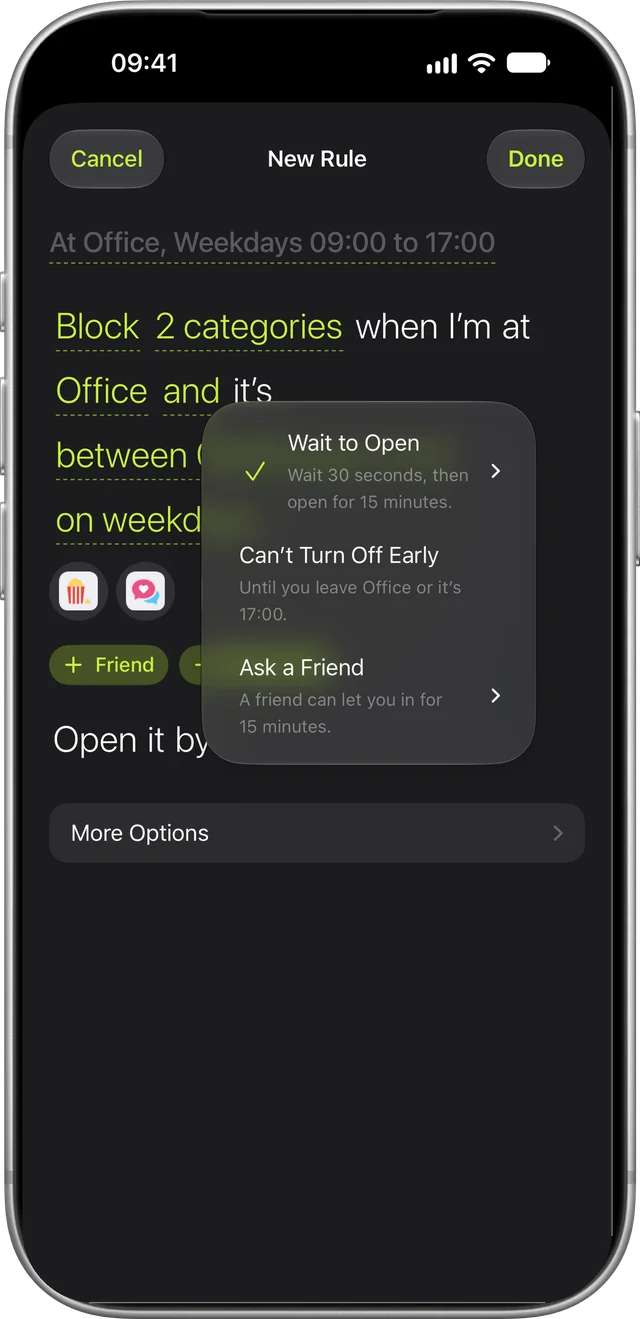
- Tap the last part of the sentence, “Open it by…”, and choose Can’t Turn Off Early.
- Tap Done. MindFence asks you to confirm, because this one is hard to undo.
For the first 10 minutes after it starts, you can still change it, in case you picked the wrong apps or typed 19:00 when you meant 17:00. After that it stays on until it ends.
For a real emergency
Maybe your boarding pass is in an app, or a room change is posted in a group chat. Tap Break Glass on the blocked screen and confirm. That rule opens for 15 minutes, then the block comes back. You get five a month.
Calls are never blocked. MindFence doesn’t touch the Phone app, emergency calls or Medical ID.
Want something gentler?
Most rules don’t need a lock. Wait to Open makes a blocked app wait, from 10 seconds to 5 minutes, then opens it for 15 minutes. That short wait is often enough to put the phone down. Or choose Ask a Friend, and a friend you pick can approve 15 minutes from their phone. Friends never see which apps you block.
You can mix them: Wait to Open in the day, Can’t Turn Off Early for bedtime.
Good rules to lock
- Exam season: block social when you’re at the library, until you leave. See blocking apps at the library.
- Deadline week: block social and video 09:00 to 17:00 on weekdays. See blocking apps at work.
- Bedtime: block everything but calls and your alarm, 22:00 to 07:00.
- A daily limit: 20 minutes of social a day, then blocked until tomorrow.
Try MindFence free
Pick the apps, then where or when. No account needed. Works on iPhone and iPad with iOS 18 or later, and Mac with macOS 15.3 or later.
Free for 7 days.