MindFence vs Brick: a Brick alternative with no device to carry
Checked October 2026.
People buy Brick to make their most distracting apps hard to open. If you’re looking for a Brick alternative, MindFence does the same with no device to buy or carry. Rules start by themselves when you get to the office or the library, and stop when you leave.

Free for 7 days.
Brick vs MindFence at a glance
| MindFence | Brick | |
|---|---|---|
| Price | Free for 7 days, then a plan | $59 per device (US, October 2026) |
| Device needed | No | Yes, to unblock |
| If you lose it or leave it at home | Nothing to lose | Five Emergency Unbricks, then a reset request |
| Starts when you arrive at a place | Yes, when you arrive | Not listed |
| Starts at a set time | Yes, different hours each day | Yes, schedules |
| Hard to undo | Can’t Turn Off Early, until the time is up or you leave the place | Go back to the Brick; Strict Mode locks settings and stops deleting the app |
| Gentler option | Wait to Open: 10 seconds to 5 minutes | None listed |
| Friends | Block apps when you’re both at a place; a friend can approve 15 minutes | None listed |
| iPad | Yes, rules and places sync with your iPhone | Not listed |
| Setup | Install and make a rule in a few taps | Buy the device, then set up the app |
An app like Brick, without the device
- Save a place once, like your office, the library or the gym.
- Pick the apps that pull you away.
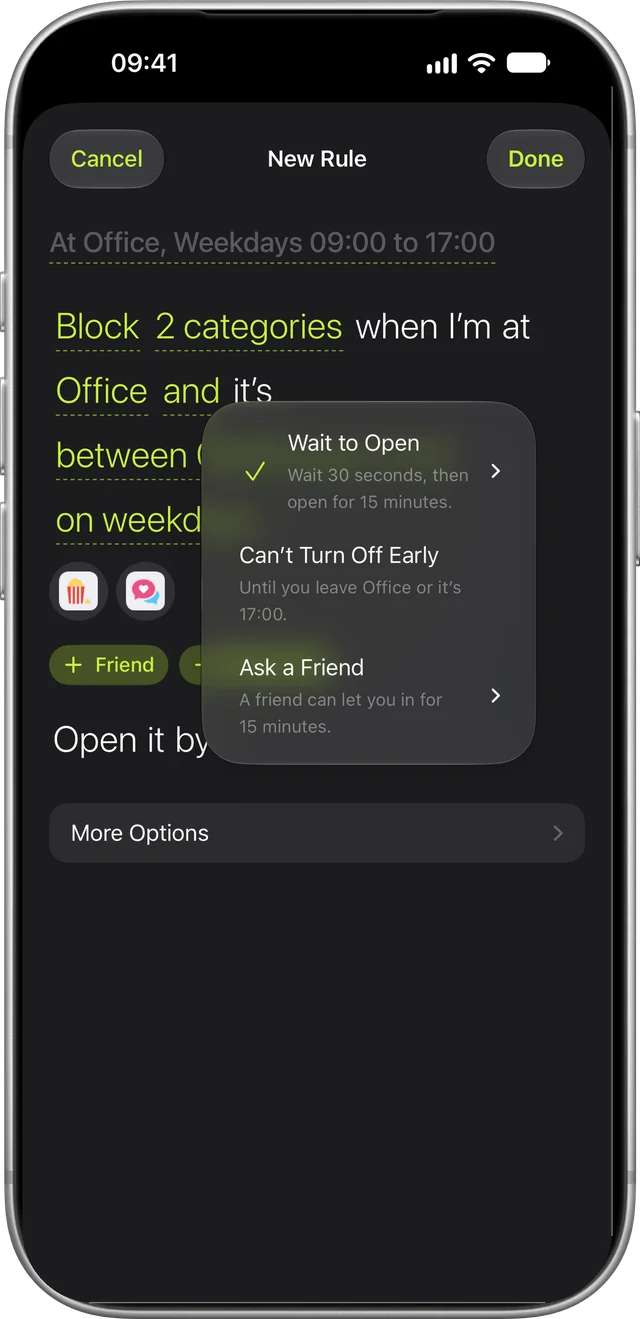
- Choose how strict. Can’t Turn Off Early keeps the rule on until you leave or the time is up. Wait to Open makes you wait up to 5 minutes. With Ask a Friend, a friend you choose can approve 15 minutes.
Why MindFence
No device to carry
With Brick, unblocking needs the device. If it’s at home while you’re at work, or lost, you’re spending Emergency Unbricks, which Brick says are for emergencies only. MindFence’s rules are on your phone, so they’re wherever you are.
It starts when you arrive
Apart from its schedules, a Brick block starts with a tap, and on a busy day that’s the step that gets skipped. A MindFence rule can start because of where you are: Block social when I’m at Office. Walk in and the apps are blocked, even with MindFence closed.
Hard to turn off
Set a rule to Can’t Turn Off Early and MindFence won’t let you turn it off, delete it or change its apps until the time is up or you leave. MindFence asks you to confirm before you save one. For a gentler rule, Wait to Open makes you wait up to 5 minutes before an app opens. For a real emergency, Break the Glass opens a rule for 15 minutes, five times a month.
Time together, phones away
Block apps when you and a friend are both at the library, so you keep each other on track. A friend can approve 15 minutes from their own phone, and you can see each other’s Time Blocked. Friends never see which apps you block.
iPhone, iPad and Mac from one setup
Your rules, places and friends sync between your iPhone, iPad and Mac through iCloud. On a Mac, MindFence blocks websites.
Questions
Is Brick worth it?
That depends on whether the device will always be with you. Brick costs $59 in the US and needs the device to unblock, with five Emergency Unbricks for when it isn’t. MindFence has no device to buy or carry: you can try it free for 7 days, and rules start by themselves when you arrive.
Is there a free Brick alternative?
MindFence needs no device to buy and no account, and you can try it free for 7 days.
Is there an app like Brick with no device?
Yes. MindFence blocks apps with nothing to carry. A rule can start when you arrive somewhere, and on Can’t Turn Off Early MindFence won’t let you turn it off, delete it or edit it until the time is up or you leave the place.
Do I need a device like Brick to block apps?
No. MindFence blocks apps with no device to buy: a rule starts when you arrive at a place or at a time, and Can’t Turn Off Early keeps the rule on until you leave the place or the time is up.
What happens if I lose my Brick or leave it at home?
Brick gives you five Emergency Unbricks for that. Once they’re used up, you request a reset in the Brick app and Brick’s pages say it takes one to two business days. With MindFence there’s nothing to leave behind.
Is MindFence as strict as Brick?
Set a rule to Can’t Turn Off Early and MindFence won’t let you turn it off, delete it or change its apps until it ends. Break the Glass opens a rule for 15 minutes, five times a month, for real emergencies.
Does Brick work on iPad?
iPad isn’t listed on Brick’s pages. MindFence works on iPhone, iPad and Mac, and your rules sync between them through iCloud.
Can friends be part of it?
In MindFence, yes. A rule can start when you’re both at the library, or a friend can approve 15 minutes. Brick doesn’t list friend features.
Try MindFence free
Pick the apps, then where or when. No account needed. Works on iPhone and iPad with iOS 18 or later, and Mac with macOS 15.3 or later.
Free for 7 days.